> ## Documentation Index
> Fetch the complete documentation index at: https://docs.chromaflow.ai/llms.txt
> Use this file to discover all available pages before exploring further.
# Contextual Menu
> Add one-click AI integrations to your docs and share page context to AI tools.
# Contextual menu
> Add one-click AI integrations to your docs
```tsx
export const PreviewButton = ({ children, href }: { children: React.ReactNode; href: string }) => {
return (
{children}
);
};
```
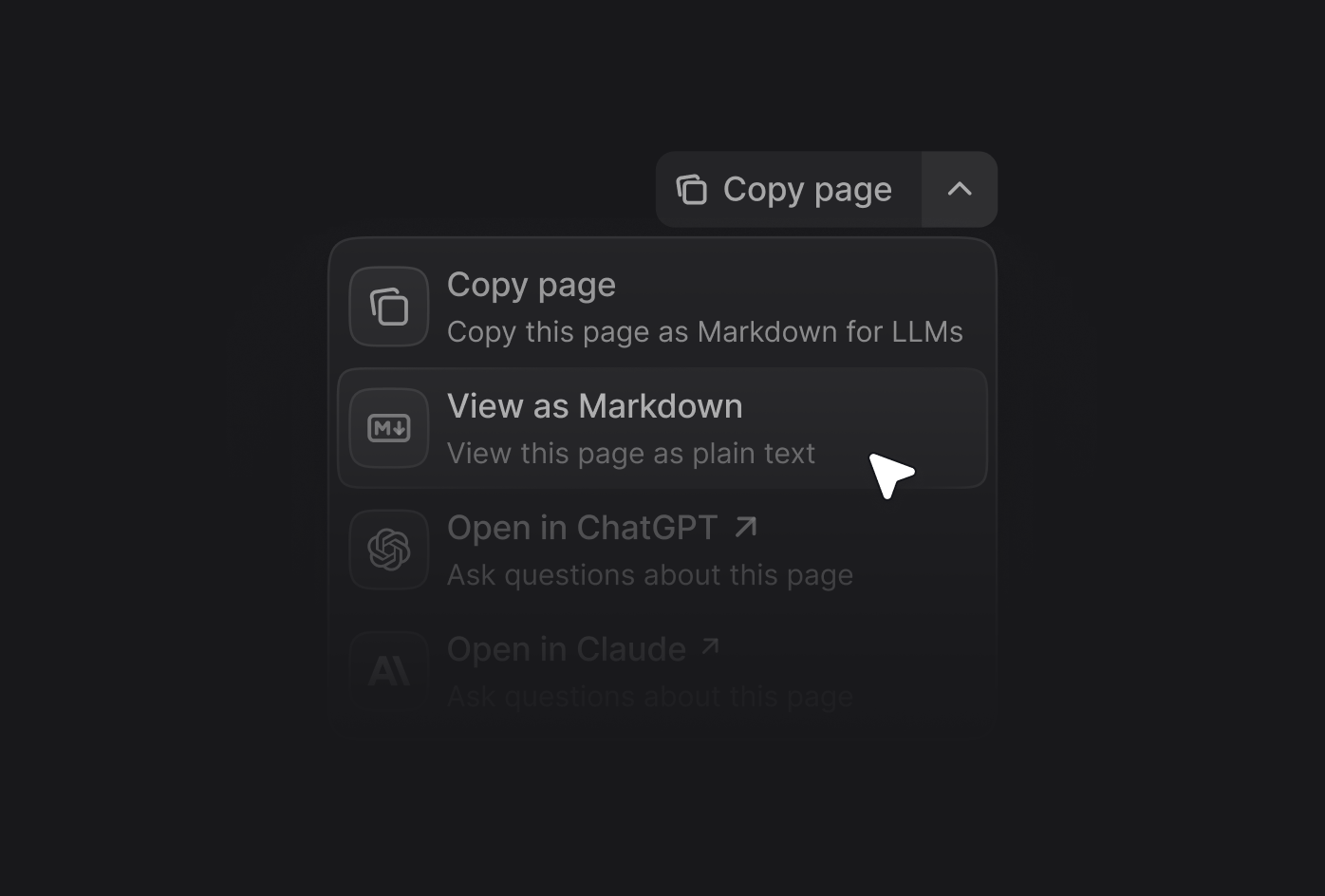
The contextual menu provides quick access to AI-optimized content and direct integrations with popular AI tools. When users open the contextual menu on any page, they can copy content as context for AI tools or open conversations in ChatGPT, Claude, Perplexity, or a custom tool with your documentation loaded as context.
## Menu options
Enable any of the built-in options by adding their identifier to your configuration.
| Option | Identifier | Description |
| :---------------------- | :----------- | :--------------------------------------------------------- |
| **Copy page** | `copy` | Copies the current page as Markdown for AI tools |
| **View as Markdown** | `view` | Opens the current page as Markdown |
| **Open in ChatGPT** | `chatgpt` | Starts a ChatGPT conversation with this page as context |
| **Open in Claude** | `claude` | Starts a Claude conversation with this page as context |
| **Open in Perplexity** | `perplexity` | Starts a Perplexity conversation with this page as context |
| **Copy MCP server URL** | `mcp` | Copies your MCP server URL |
| **Connect to Cursor** | `cursor` | Installs your hosted MCP server in Cursor |
| **Connect to VS Code** | `vscode` | Installs your hosted MCP server in VS Code |
 ## Enabling the contextual menu
Add the `contextual` field to your `docs.json` file and include the options you want:
```json
{
"contextual": {
"options": ["copy", "view", "chatgpt", "claude", "perplexity", "mcp", "cursor", "vscode"]
}
}
```
## Adding custom options
Create custom options by adding an object to the `options` array. Each custom option supports:
The title of the option.
The description shown when the contextual menu expands.
The icon to display. Options: Font Awesome name, Lucide name, JSX-compatible SVG in `{}` braces, URL, or local path.
Font Awesome style if using FA icons. One of: `regular`, `solid`, `light`, `thin`, `sharp-solid`, `duotone`, `brands`.
The target link. Use a string for simple links or an object for dynamic links with query params.
### href object
The base URL for the option.
The query parameters to append to the base URL. Use these placeholders in `value`: - `$page`: current page content in
Markdown - `$path`: current page path - `$mcp`: hosted MCP server URL
### Example custom option
```json
{
"contextual": {
"options": [
"copy",
"view",
"chatgpt",
"claude",
"perplexity",
{
"title": "Request a feature",
"description": "Join the discussion on GitHub to request a new feature",
"icon": "plus",
"href": "https://github.com/TypeTenzinHoTT/FrodoFinal/discussions/categories/feature-requests"
}
]
}
}
```
### Custom option examples
```json
{
"title": "Request a feature",
"description": "Join the discussion on GitHub",
"icon": "plus",
"href": "https://github.com/TypeTenzinHoTT/FrodoFinal/discussions/categories/feature-requests"
}
```
```json
{
"title": "Share on X",
"description": "Share this page on X",
"icon": "x",
"href": {
"base": "https://x.com/intent/tweet",
"query": [
{ "key": "text", "value": "Check out this documentation: $page" }
]
}
}
```
## Enabling the contextual menu
Add the `contextual` field to your `docs.json` file and include the options you want:
```json
{
"contextual": {
"options": ["copy", "view", "chatgpt", "claude", "perplexity", "mcp", "cursor", "vscode"]
}
}
```
## Adding custom options
Create custom options by adding an object to the `options` array. Each custom option supports:
The title of the option.
The description shown when the contextual menu expands.
The icon to display. Options: Font Awesome name, Lucide name, JSX-compatible SVG in `{}` braces, URL, or local path.
Font Awesome style if using FA icons. One of: `regular`, `solid`, `light`, `thin`, `sharp-solid`, `duotone`, `brands`.
The target link. Use a string for simple links or an object for dynamic links with query params.
### href object
The base URL for the option.
The query parameters to append to the base URL. Use these placeholders in `value`: - `$page`: current page content in
Markdown - `$path`: current page path - `$mcp`: hosted MCP server URL
### Example custom option
```json
{
"contextual": {
"options": [
"copy",
"view",
"chatgpt",
"claude",
"perplexity",
{
"title": "Request a feature",
"description": "Join the discussion on GitHub to request a new feature",
"icon": "plus",
"href": "https://github.com/TypeTenzinHoTT/FrodoFinal/discussions/categories/feature-requests"
}
]
}
}
```
### Custom option examples
```json
{
"title": "Request a feature",
"description": "Join the discussion on GitHub",
"icon": "plus",
"href": "https://github.com/TypeTenzinHoTT/FrodoFinal/discussions/categories/feature-requests"
}
```
```json
{
"title": "Share on X",
"description": "Share this page on X",
"icon": "x",
"href": {
"base": "https://x.com/intent/tweet",
"query": [
{ "key": "text", "value": "Check out this documentation: $page" }
]
}
}
```